
A scan history records when, not what
Most scanner apps keep a history: the values they have read, newest first, a time beside each. Take 4006381333931 — a valid EAN-13, exact and useful to a product database somewhere and meaningless to you. A history records that you scanned something, not what you kept.
Searching your photos is not the answer either
Photo libraries do read text inside pictures, best of all on screenshots, but styled type and half-covered labels degrade them. Even working perfectly they hand back a substring. At a counter nobody types 4006381333931. You think the bakery one.
A code gets into the collection from one picture or from many. Both routes have a guide of their own, with a screenshot for every step: Scan from an image · Bulk import
The name on the card is somebody else's word for it
Research into how people name things is blunt. Asked to name the same object, two people land on the same term less than a fifth of the time, in every domain tested.
The brand on the front of a card is one such word, chosen to stand out on a shelf rather than to surface in your head three months later while somebody waits. About once in five it is also yours.
So name a card after the job and keep the brand second: store card, fuel card, parking permit. You read the beginning of a line before the end of it, so the opening word does the work. One person can hold three codes from the same chain, and the chain is what they share.
A folder has to remove about twenty things before it pays
Studies that timed people finding their own files fitted the time to two things: how many steps down they went, and how many items were in view. A step down cost a little over two seconds, each extra item about a tenth of one.
So a folder pays for itself only once it removes about twenty-one items from the list you would otherwise read. The folders those studies observed held fifteen at the median, so most were not paying. Depth is worst at both extremes, so keep the folders few.
| Codes you have kept | What finds one fastest |
|---|---|
| Up to about twenty | Good names, one flat list |
| More than twenty | Folders*, few enough to read at a glance |
| You have forgotten where it went | Search across the collection* |
* Part of ScanKeeper Premium, along with CSV export.
Why people browse instead of searching
Typical users search for their own files about a tenth of the time, and better search does not change it. Browsing asks you to recognize a name; search asks you to produce one from memory and type it. Tags fare worse: given both, people reach for folders.
Some codes will fail you however well you file them
An organizer works because a code is a stable string. Most are. The ones that are not tend to be the codes you would most want ready.
Codes that change while you are looking at them
A SafeTix ticket barcode redraws every fifteen seconds, and screenshots and printouts are not accepted at entry. Parcel locker codes go stale for a different reason: DHL Packstation codes regenerate at short, regular intervals, and Amazon Hub and InPost codes stop working after three days.
Coupons carry a deadline instead. A single-use code is serialized so it can be invalidated on redemption, and many expire within a day or two. If you keep one, the date belongs in the name, because the code does not carry it.
A wifi code is a password in a picture
A wifi QR code is plain text holding the network name and the password, which is why a phone reads one without an app. It never expires, and it is the credential itself. Keep it where you keep the password.
Finished with a code is not the same as done with it
Deleting is a decision, and most people decline to make it. Around four in ten actively avoid deleting their own photos and video. Any system whose tidy state depends on deleting will stay untidy.
Personal information falls into three piles: ephemeral, working, archived. A coupon for this weekend is ephemeral. The card you use weekly is working. Last year's ticket and the code from the washing machine box are archived, kept but out of the way. The failure is never moving anything into the third pile.
Archiving is the version of that decision people will actually make, because nothing is given up. Some codes even have a lifespan you can look up: in the EU a new item carries a legal guarantee of at least two years, longer in some member states, and you may be asked to show proof of purchase during it.
All of which is easier to arrange than to argue about. Open ScanKeeper and give the twenty codes you actually carry a name each; everything above was what to do when there are two hundred.
How to organize saved codes you will need in a hurry
- 01
Name it the way you would ask for it
Replace the value with a phrase you would say out loud, distinguishing word first. A color gives the card a second thing to recognize.
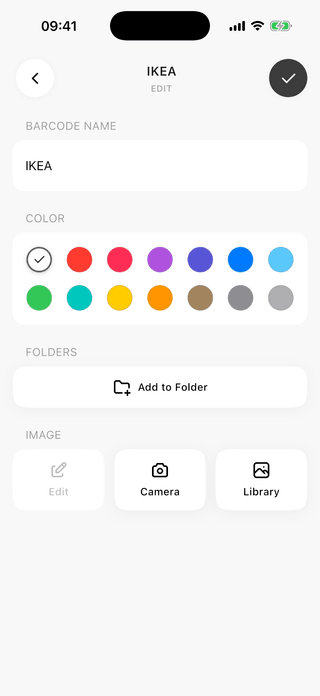
The name is the one part of a card you wrote yourself. - 02
Add a folder once the list stops fitting
Group by what a card is for, not by what kind of code it holds. Below about twenty cards, skipping this costs you nothing.
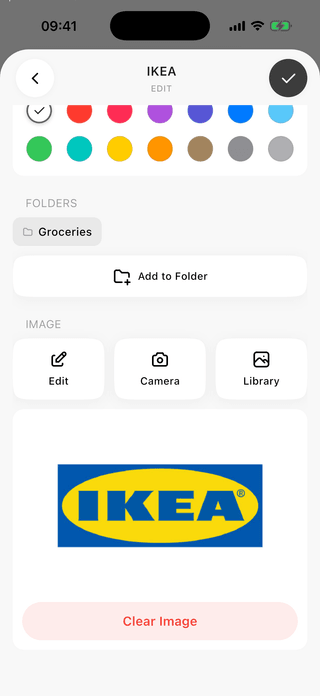
Folders follow how you use a card, not its format. - 03
Search when you have forgotten where it went
Type the word you would have used at the time. The library narrows as you type, which is the way back to a card you cannot picture.
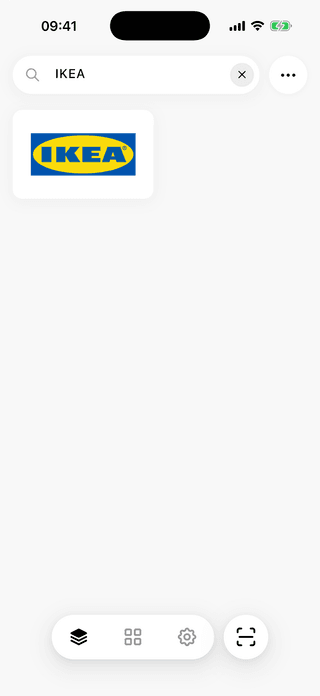
Filtering happens as the letters land. - 04
Check that you opened the right one
Two similar cards separate here. The card sheet carries the format, a copy button for the encoded value, and a count of how often you opened this one.
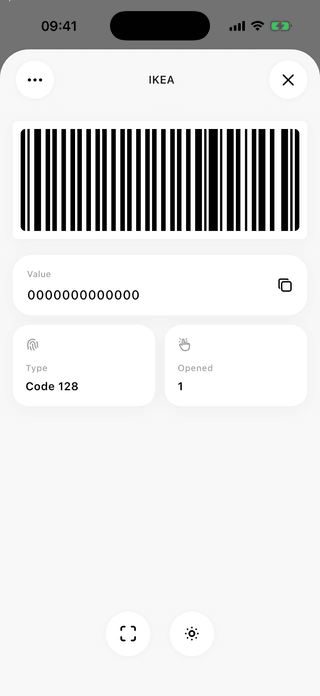
The value copies straight from this sheet. - 05
Move what you are finished with out of the way
Actions holds the tools that work on the whole collection: folders, the archive that takes a card out of the active list, and CSV export.
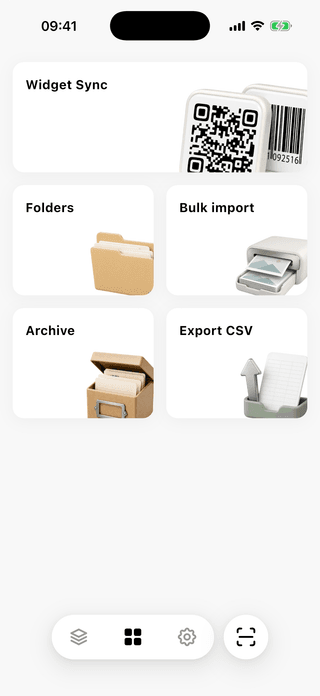
Archived cards leave the list and stay recoverable.




What an organized collection is worth when somebody is waiting
Recognition beats recall
Reading names you wrote yourself is easier than producing the right word from memory and typing it.
A shorter list to read
Every card a folder takes out of view comes off the next retrieval. Under about twenty codes, names already do that job.
The pile stops growing at you
Archiving keeps the active list the size of your actual week, and nothing has to be deleted for that to work.
What to know before you start
How many saved codes before folders are worth making?
About twenty. Below that a folder costs more time than it saves: you pay for the extra step on every retrieval and get back a barely shorter list.
Folders or tags?
Folders, for a collection this size. Given both, people store and retrieve with folders, use a single tag per item when they tag at all, and do worse from tags.
What should I actually call a card?
What you would say to the person at the counter, distinguishing word first and brand second. Two people pick the same term for the same thing less than a fifth of the time.
Is search enough on its own?
Rarely. People search for their own files about a tenth of the time and browse for the rest, because recognizing a name is easier than producing one. Search is the backstop.
Can I save a ticket whose barcode keeps changing?
You can save a picture of it, and it will not get you in. A SafeTix barcode redraws every fifteen seconds, and screenshots and printouts are not accepted at entry.
Is a wifi QR code worth keeping?
It works, which is the problem. The code is plain text holding the network name and the password, it does not expire, and anyone who reads it is on your network.
What should I do with a code I have finished with?
Archive it. Deleting is a decision most people quietly avoid, so a tidy collection cannot depend on it. Archiving takes a card out of the active list and leaves it recoverable.