
The camera and the screen face opposite ways
The phone showing the code is the phone you would have to point at it, and the main camera looks out of the back. No setting turns that around.
A second phone is still a camera pointed at a screen
A display is a grid of pixels and a camera sensor is another grid. Photograph one with the other and repeating bands settle over the picture.
Two things about that banding run against instinct. It is worst when the screen is dim, because a dim display spends longer with its pixels off. It is worse again in a bright room, where a short exposure cannot average the flicker out.
There may be no distance that works
A phone's main camera stops focusing at roughly a few centimeters. Move closer for pixels and the shot goes soft; back off to focus and the code is too small to decode.
What the phone already does on its own
Both platforms can already read a code out of a picture, and both are quiet about it.
On iOS, press and hold the code in Photos
Open the picture in Photos, press and hold the code, and the phone offers what it found. Live Text has to be on first, under Settings, General, Language & Region, and it is not available in every region or language.
The capability arrived in iOS 16, not iOS 15; iOS 15 is when Live Text for ordinary text landed. Apple has never documented this route. Its instructions for scanning a QR code cover the camera and a Control Center control you add by hand, never a saved photo.
On Android, circle the code where it sits
Circle to Search is the route built for a code already on the screen. Press and hold the home button or the navigation handle, then circle the code. It reads codes inside an email, a PDF, a photo or a video.
It needs the Google app with Google set as the assistant. The rest of Android 17 is live camera, including the Pixel camera app, which will not scan in portrait or video mode. Manufacturer skins vary.
Visual intelligence is not the tool for this
In iOS 26 it works on whatever is on the screen, which sounds exactly right. It is not. Nothing it does touches QR codes or barcodes; it needs an iPhone 15 Pro or later; and it exists in sixteen languages, in beta.
Where those routes stop
The engines underneath read one-dimensional barcodes, but the buttons on top assume a link: every action either platform offers is a version of open this website. A shop card is a plain EAN-13 with no address in it.
Then there are payloads that are not links at all. A wifi credential is a string; so is an eSIM activation code, which an iPhone will act on through the camera but not from Photos.
And nothing is kept. You tap the link, the sheet closes, and next week you are hunting the same screenshot again. Apple Wallet is no help, because a pass has to be issued and signed by the merchant: Cards in Apple & Google Wallet
Which is the whole reason the app exists: a code kept as a card is still there the second time you need it, with nothing to hunt for. ScanKeeper is free on iOS and Android.
The shortest route never saves the picture
Every route so far begins with the picture being somewhere: in your library, in a file you kept. Most codes do not arrive that way. They arrive inside something — an email, a chat, a booking confirmation, a page you have open — and saving a copy first is a step you take only because the tool asked for one.
So do not save it. Whatever app is holding the picture has a share button, and ScanKeeper sits in that list beside the messaging apps.

On iOS the naming happens without leaving the app
A panel comes up over whatever you were reading: the picture with the code lit and the rest of it dimmed, a field for the name, and Save. Then the panel goes and you are back in the email. ScanKeeper never opens, and that is not a flourish — iOS does not permit a share extension to open its own app, so everything it can finish, it finishes there.
If the shot holds several codes, each gets a turn, with a counter and a Skip for the ones you do not want. Closing it with the cross is a refusal rather than a delay: whatever you have not saved is dropped, and nothing is waiting for you the next time you open the app.
On Android the app opens and does the same work
Android has no equivalent panel, so ScanKeeper comes to the front and shows the same import screen you would have reached from Actions. The result is identical and the journey is one screen longer, which is worth knowing if you have used both phones and expected them to match.
A ticket can go across as a PDF
The attachment does not have to become a screenshot on the way. Send the file itself and its pages are drawn as pictures on the device, then read like any other image, which is the difference between a code at full size and a code frozen at whatever zoom the screen was at.
None of these routes touches the original. What arrives is copied, the copy is what gets read, and the copy is thrown away afterwards — nothing is written back into your library, your mail, or your files.
When an image will not read
About three pixels per module
A QR code is a grid of modules, the small squares it is built from. Decoding becomes dependable at about three pixels per module; two is the published floor, not a target.
So a code twenty-five modules wide wants roughly seventy-five pixels across, and an EAN-13, ninety-five units wide, wants at least a hundred and ninety.
The margin is part of the code
Cropping tight is the commonest way to break a code that was fine. A QR code needs a clear margin four modules wide on every side. EAN-13 wants eleven module-widths on the left and seven on the right, so trimming the left edge costs more.
Contrast, and the thirty percent myth
Pale gray on white fails the grading standards outright, and a photograph or gradient behind a code ruins the contrast module by module. Dark on light is reliable.
The thirty percent a QR code can supposedly lose is a ratio of codewords, not of area, and the three corner squares are not protected at all. A logo in the middle survives; a thumb over a corner does not.
One-dimensional codes have no correction whatever. A check digit notices an error but cannot repair one, so a glare band across the bars is fatal where a QR code would shrug.
When nothing reads at all
When the picture is past saving, the value under the code usually is not.
Use the camera, import an image, or enter the value manually. All three routes create the same editable card.
For a photo library full of them, there is a faster route: Bulk import
Not every code in a picture is worth keeping
Photo libraries collect these without being asked.
The ones worth a name
Anything you will be asked for again: a loyalty barcode from an email, a gym or library number, a locker code from a delivery notice, a coupon with a date on it.
The ones a picture cannot hold
A rotating ticket barcode refreshes every fifteen seconds, and a screenshot of it will not get you through the gate. If a code animates or counts down, the picture is worthless. How long a saved code stays good is a subject of its own: Barcode organizer
How to scan a QR code from a screenshot or a saved photo
- 01
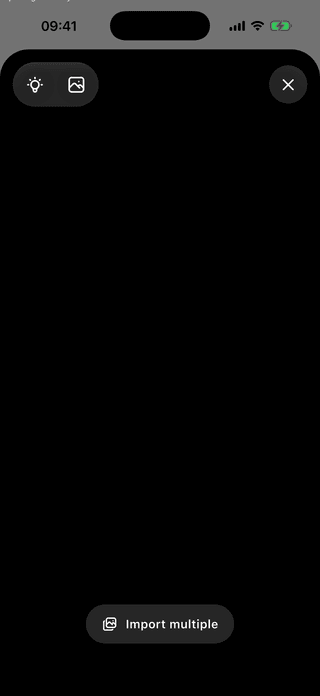
Open the scanner and use the gallery option
Tap the scanner button in your library, then the photo control at the top. There is nothing to aim at, and nothing stopping you choosing several pictures at once.
Choose an existing image from the same phone. - 02
Check what came back
ScanKeeper reads the picture on the device and shows the format it recognized beside the value it decoded.
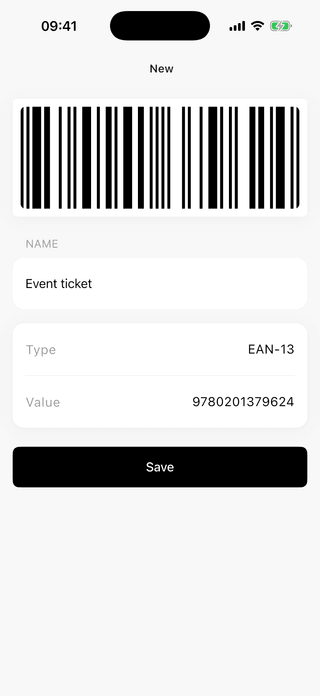
Check the detected type and encoded value. - 03
Save it as a card
Give it a name you would say out loud, then save. The card keeps the value and the format.
A name beats a row of digits a month later. - 04
Open it again without the picture
A saved card shows the code, its value with a copy button, the format, and how often you have opened it.
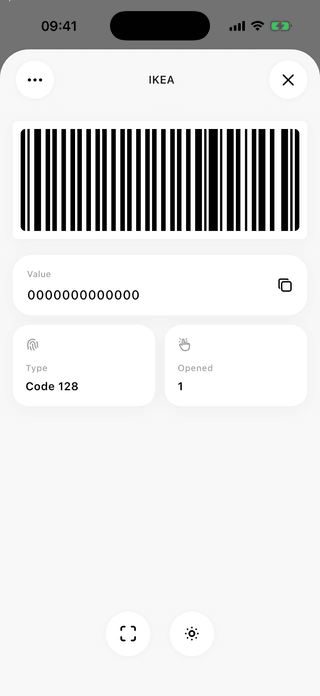
The decoded value, ready to copy.



What a saved code does that a picture cannot
No second phone needed
Analyze a code displayed in an email, message, PDF screenshot, or saved photo on the same device.
On-device detection
Image scanning works locally, without sending the barcode to a ScanKeeper server.
A value, not only a link
Codes holding no web address come back as a value you can read and copy.
What to know before you start
Can I scan a QR code from a screenshot on the same phone?
Yes, and you may not even have to save it. Share the picture to ScanKeeper from the app it is already in, or save it and pick it from the gallery option later. Neither route needs a second device.
Why did the camera read the code when the saved photo did not?
A live camera gets many attempts and can move, refocus and change angle until one frame decodes. A saved picture gets one attempt at the quality it was captured.
Can ScanKeeper read barcodes as well as QR codes from photos?
Yes. ScanKeeper analyzes images for supported QR and barcode formats, including common EAN, UPC, Code 128, PDF417, Data Matrix, and Aztec codes.
Can I read a QR code that sits inside a PDF?
Hand over the PDF rather than a screenshot of it. Its pages are drawn as pictures on the device and read like any other image, which keeps the code at full size instead of freezing it at whatever zoom you were at.
What if the picture holds more than one code?
You are offered each in turn, with that one lit and the rest of the shot dimmed. A confirmation email carrying a ticket code and a lounge pass gives you both, and a Skip for the one you did not want.
Will a screenshot of my event ticket get me through the gate?
Often not. A barcode that refreshes every few seconds is built so that a still picture is worthless, and some ticket apps block screenshots outright.
What if nothing can read the picture at all?
Type it in. The number printed under a barcode is the code, and entering it by hand with the right format produces the same card as a scan.
Does image scanning need an internet connection?
No. Image analysis runs on the device and does not require an account or an internet connection.